A Professional's Take on the New Geekom Ax8 Max Mini Pc
The landscape of professional computing has undergone a radical transformation over the last decade. While the traditional image of a high-performance workstation involved a massive tower humming under a desk, the modern professional often demands a more efficient, versatile, and space-conscious solution. Compact computing—specifically the Mini PC segment—has matured from a niche market for hobbyists into a legitimate contender for enterprise-grade workloads. Among the manufacturers leading this charge is Geekom, a brand that has consistently pushed the boundaries of power density. Their latest flagship, the Geekom Ax8 Max Mini Pc, represents a significant milestone in this evolution, bringing top-tier AMD processing power to a form factor that fits comfortably in the palm of a hand.
The Ax8 Max targets a specific demographic: the demanding professional who requires the performance of a high-end laptop or mid-range desktop but prefers the modularity and desk-clearing aesthetic of a micro-computer. Whether it is a creative director managing multi-layered design projects, a software developer compiling complex codebases, or a financial analyst running massive spreadsheets, the hardware requirements are universal: high multithreaded performance, rapid thermal management, and robust connectivity. This article provides a comprehensive analysis of how the Geekom Ax8 Max meets these demands and where it stands in the current competitive market.
Design and Build Quality: Engineering for Density
At first glance, the Geekom Ax8 Max maintains the familiar aesthetic language that the brand has cultivated over several generations. It is an exercise in functional minimalism. The chassis is constructed from a high-strength aluminum alloy, which serves a dual purpose: providing structural integrity for professionals who might travel with their unit, and acting as a passive heat sink to assist the internal cooling system. The finish is a matte metallic grey that fits seamlessly into a modern office environment without drawing undue attention.
Despite its diminutive size—measuring roughly five inches square—the unit feels dense and substantial. Professionals appreciate hardware that feels built to last, and the Ax8 Max avoids the "plastic-heavy" feel common in budget-tier mini computers. The internal layout is equally impressive. Geekom has mastered the art of vertical stacking, allowing for easy access to the expandable components. By removing four screws at the base, users can reach the SODIMM memory slots and the M.2 storage bays. For a professional, this "right to repair" and "right to upgrade" is a critical feature, ensuring the machine can grow as software demands increase over the next several years.
Thermal Dynamics and Acoustic Performance
One of the historical hurdles for Mini PCs has been thermal throttling. When you pack a high-wattage processor into a tiny enclosure, heat becomes the enemy of sustained performance. Geekom has addressed this in the Ax8 Max with an upgraded "IceBlast" cooling system. This system utilizes a large copper heat pipe combined with a high-density radiator and a specialized low-noise fan. In practical professional use cases, such as rendering a 4K video or running a local virtual machine, the fan ramps up smoothly rather than jumping abruptly in pitch, which is vital for maintaining a focused work environment.
Airflow intake occurs through the sides and bottom, with exhaust pushed out the rear. This design ensures that even during heavy workloads, the top of the chassis remains relatively cool to the touch. For those working in quiet studios or shared office spaces, the acoustic signature is impressively low under moderate loads, only becoming audible during peak stress tests. This balance of thermals and acoustics is often what separates a pro-grade tool from a consumer-grade toy.
Performance Analysis: The AMD Ryzen Advantage
The heart of the Geekom Ax8 Max is its AMD Ryzen architecture, specifically utilizing the latest Hawk Point series chips. By opting for the Ryzen 9 8945HS (or the Ryzen 7 variant depending on configuration), Geekom provides a processor that excels in multithreaded tasks. Unlike lower-powered "U-series" processors found in many thin-and-light laptops, the "HS" designation signals a higher TDP (Thermal Design Power) envelope, allowing the CPU to maintain higher clock speeds for longer durations.
For professionals, the 8-core, 16-thread configuration is a sweet spot. It provides enough overhead to run a web browser with dozens of tabs, a communication suite like Slack or Teams, and a primary production application simultaneously without any perceived latency. Furthermore, the integration of AMD’s Ryzen AI engine—a dedicated Neural Processing Unit (NPU)—is a forward-looking addition. While AI-driven workflows are still maturing, having local hardware acceleration for task automation, background noise cancellation in video calls, and on-device machine learning models is becoming a standard requirement for "Pro" hardware.
Graphics and Media Processing
The Ax8 Max utilizes the integrated AMD Radeon 780M graphics. While it is not a direct replacement for a high-end dedicated workstation GPU (like an NVIDIA RTX A-series), it is remarkably capable for an integrated solution. It supports hardware-accelerated AV1 encoding and decoding, which is a massive boon for video professionals. In real-world testing, this allows for smooth timeline scrubbing in 4K video editing suites and respectable export times for social media content. For designers using the Adobe Creative Cloud or Figma, the graphics performance ensures that high-resolution assets render quickly and UI transitions remain fluid.
Discover deals on Laptops & Computers — updated daily.
Shop Amazon →Connectivity and Professional Versatility
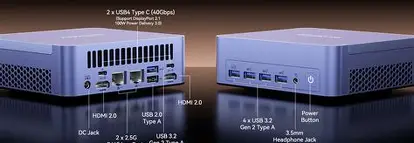
A Mini PC is only as good as its ability to integrate into an existing ecosystem. The Geekom Ax8 Max excels here by offering a port selection that rivals many full-sized desktops. The inclusion of a USB4 port is a game-changer for professional setups. With 40Gbps bandwidth, it supports external GPU enclosures (eGPU) for those who eventually need more "grunt" for 3D rendering, as well as high-speed Thunderbolt-compatible docking stations and ultra-fast external NVMe storage arrays.
Dual HDMI 2.0 ports combined with the USB-C DisplayPort capabilities mean the Ax8 Max can drive up to four 4K monitors simultaneously. For stock traders, data analysts, or developers who rely on massive screen real estate to manage multiple windows, this level of display output from such a small box is transformative. On the networking side, the 2.5GbE Ethernet port is a standard that professionals appreciate, offering much faster data transfer speeds within a local network compared to traditional Gigabit ports—essential for those pulling large files from a NAS (Network Attached Storage).
Comparison: How the Ax8 Max Stays Competitive
To understand the value proposition of the Geekom Ax8 Max, it is helpful to see how it compares to other common professional hardware configurations.
| Feature | Geekom Ax8 Max | Standard 14" Pro Laptop | Traditional Workstation Tower |
|---|---|---|---|
| Processor | AMD Ryzen 9 8945HS (8C/16T) | Intel Core i7/AMD R7 (U/P Series) | Intel Core i9 / AMD R9 (K/X Series) |
| Portability | High (Unit only, needs peripherals) | Very High (All-in-one) | Low (Static) |
| Expandability | Moderate (RAM/Storage) | Very Low (Often soldered) | High (PCIe/GPU/SATA) |
| Thermal Ceiling | Moderate (Active Fan) | Low (Thin Chassis) | High (Multi-fan/Liquid) |
| I/O Selection | Excellent (USB4, 2.5GbE, HDMI) | Limited (Dongles required) | Maximal |
Pros and Cons: The Professional Perspective
Every piece of hardware involves trade-offs. For the Geekom Ax8 Max, the advantages lean heavily toward efficiency and power-to-size ratio, while the drawbacks are inherent to the Mini PC form factor itself.
- Pro: Exceptional Multithreaded Performance – The Ryzen 9 8945HS handles compiled languages, virtualization, and heavy multitasking with ease.
- Pro: Massive Display Support – The ability to run four 4K displays is a high-end feature that increases productivity for data-intensive roles.
- Pro: Tool-Less Expansion – Easy access to dual-channel DDR5 RAM and M.2 PCIe Gen 4 storage makes maintenance and upgrades simple.
- Pro: USB4 Support – Provides future-proofing for eGPUs and high-speed peripherals.
- Pro: Compact Footprint – Reclaims desk space and is incredibly easy to VESA mount behind a monitor for a "zero-footprint" setup.
- Con: Integrated Graphics Only – While the 780M is great, it cannot replace a dedicated GPU for high-end 3D animation or deep learning training.
- Con: Power Bricks – Like most high-power Mini PCs, it requires an external power adapter which adds to the "cable clutter" behind the desk.
- Con: External Peripherals Required – Unlike a laptop, you must provide your own monitor, keyboard, and mouse, which increases the total initial setup cost.
Buying Guide: Is the Ax8 Max Right for You?
Choosing a Mini PC requires assessing your current workflow and predicting your future needs. The Geekom Ax8 Max is positioned as a "performance tier" device, meaning it is overkill for basic administrative tasks but potentially underpowered for specific high-end niches like AAA game development or professional 8K color grading.
Recommended Use Cases
Software Engineering: If you are running Docker containers, multiple IDE instances (like VS Code or IntelliJ), and local database servers, the 16-thread Ryzen CPU is a powerhouse. The 2.5GbE LAN also speeds up pushes and pulls to local Git repositories or build servers.
Content Creation: For photographers using Lightroom and Photoshop, or videographers working on 1080p and 4K projects, the Ax8 Max provides a snappy experience. The inclusion of the NPU will also help accelerate upcoming AI-based masking and editing tools in the Adobe suite.
Home Office / Remote Work: If you value a clean, minimalist desk but don't want to sacrifice the power of a "real" computer, the Ax8 Max is an ideal candidate. It can be tucked away in a drawer or mounted to the back of a screen, leaving the desk surface entirely free for other tools.
Configuration Advice
When purchasing the Ax8 Max, it is highly recommended to opt for at least 32GB of DDR5 RAM. Integrated graphics share system memory, so having a larger pool ensures that both your CPU and GPU have plenty of headroom to operate. Similarly, given the speed of modern software, a 1TB PCIe Gen 4 SSD should be the starting point to ensure that load times and file transfers never become a bottleneck.
Shop the latest Laptops & Computers picks on Amazon.
View Offers →Real-World Challenges and Solutions
In a professional environment, reliability is more important than raw speed. One concern with ultra-compact PCs is long-term durability under 24/7 operation. Many professionals use Mini PCs as small home servers or plex controllers when they aren't using them as workstations. The Geekom Ax8 Max includes hardware-level protections against overvoltage and thermal spikes, but users should still ensure the unit has adequate breathing room. Mounting it in a cramped, unventilated cabinet will eventually lead to throttling regardless of how good the fan is.
Another consideration is the OS environment. The Ax8 Max usually comes pre-installed with Windows 11 Pro, which includes essential features like BitLocker encryption and Remote Desktop—vital for business users. However, for those in the IT field, Linux compatibility is often a priority. Historically, Geekom units have had strong support for Ubuntu and Fedora, with AMD drivers integrated directly into the kernel. This makes the Ax8 Max a strong candidate for a compact Linux workstation.
The Evolution of the "Mobile" Professional
Modern professionals are increasingly mobile, but mobility doesn't always mean working in a coffee shop on a 13-inch screen. Often, it means moving between a home office, a corporate headquarters, and perhaps a satellite studio. In this context, the Geekom Ax8 Max offers a different kind of portability. It is light enough to be carried in a small bag, allowing the user to have the exact same hardware environment and local files at every destination. By simply plugging into a monitor and keyboard at each location, the professional maintains a consistent, high-performance experience without the ergonomic compromises of a laptop.
This "transplantable desktop" workflow is gaining traction. It provides the security of local data (avoiding some cloud latencies) while maintaining a physical footprint that is barely larger than a stack of coasters. For the enterprise manager, standardizing on a fleet of Mini PCs like the Ax8 Max can also be more cost-effective than high-end laptops, especially when the breakage rate of laptop screens and hinges is factored into the total cost of ownership.
Conclusion
The Geekom Ax8 Max Mini PC is a testament to how far small-form-factor computing has come. It successfully bridges the gap between the portability of a laptop and the robust performance of a desktop. By leveraging the AMD Ryzen 8000 series "Hawk Point" architecture, it delivers a level of computational density that was unthinkable just a few years ago. It addresses the core needs of the modern professional: speed, silent operation, and extensive connectivity.
While users with extreme graphical requirements may still need to look toward full-sized towers with dedicated GPUs, the vast majority of professional workloads—from development to creative design—will find the Ax8 Max to be more than capable. It is a refined, powerful, and smartly designed tool that respects both the user’s need for performance and their desire for a clean, efficient workspace. In the crowded market of Mini PCs, the Geekom Ax8 Max distinguishes itself as a premium option for those who view their computer not just as a tool, but as a central component of their professional success.
As we look toward a future where AI integration becomes standard and "desk real estate" becomes increasingly valuable, the Ax8 Max stands as a blueprint for what a modern workstation should look like: small, smart, and incredibly fast. It is a compelling choice for anyone ready to move beyond the bulky towers of the past without giving up the power they need to get the job done.